
How to Integrate a Payment Gateway in an eCommerce Website
Imagine launching your dream eCommerce store, filled with curated products, only to lose customers at checkout due to a clunky payment process. Frustrating, right? Integrating a payment gateway in an eCommerce website transforms this scenario, ensuring seamless, secure transactions that keep shoppers coming back. This guide tells the story of how to weave this critical technology into your online store, blending technical know-how with real-world insights. Whether you’re a small business owner or a seasoned developer, mastering payment gateway integration can elevate your brand’s trust and boost conversions. Let’s embark on a journey to unlock the secrets of smooth online payments, exploring practical steps, pitfalls to avoid, and tips to captivate your customers.
Understanding Payment Gateways: The Digital Cashier
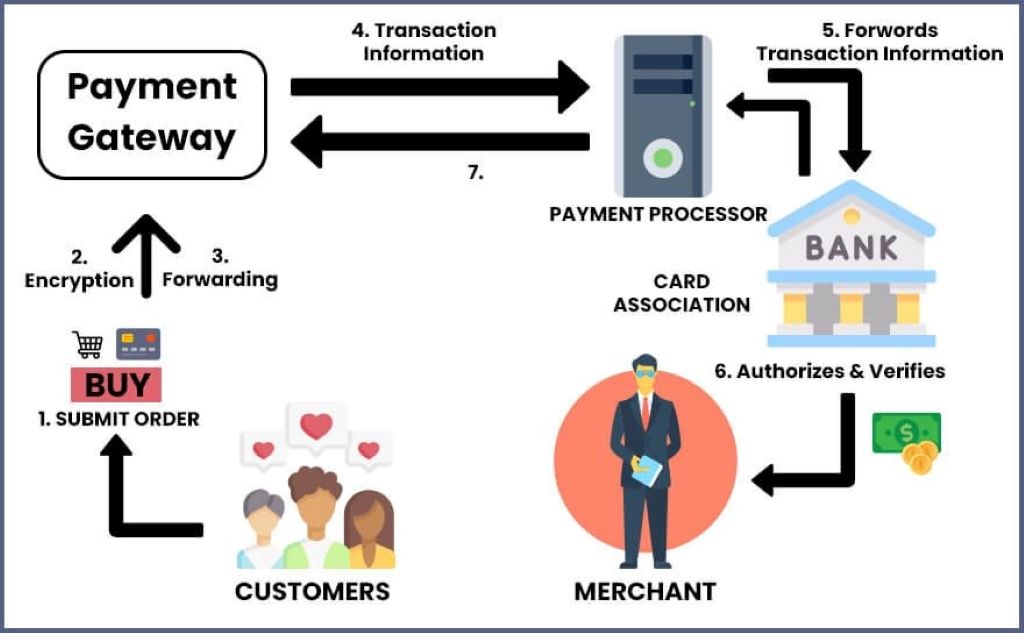
Payment gateways act like virtual cashiers, bridging your eCommerce website and customers’ banks. They securely process payments, ensuring funds move safely from buyer to seller. When I launched my first online store, I underestimated their role, thinking a simple “Buy Now” button would suffice. However, customers abandoned carts due to distrust in the payment process. Gateways like Stripe or PayPal encrypt sensitive data, verify funds, and confirm transactions, creating a smooth checkout experience. According to Statista, global eCommerce sales are projected to hit $7.4 trillion by 2025, emphasizing the need for reliable payment systems Statista.
Additionally, gateways come in two main flavors: hosted and integrated. Hosted gateways, like PayPal, redirect customers to an external page, simplifying setup but risking cart abandonment. Integrated gateways, such as Stripe, keep users on your site, enhancing trust but requiring more technical effort. Understanding these differences is crucial for choosing the right fit for your business.
Choosing the Right Payment Gateway
Selecting a payment gateway feels like picking a business partner. It’s a decision that impacts customer trust and your bottom line. When I chose Stripe for my store, its developer-friendly APIs and global reach won me over. However, your choice depends on factors like transaction fees, supported payment methods, and platform compatibility. For instance, Shopify Payments integrates seamlessly with Shopify stores, while PayPal excels for small businesses due to its simplicity Stripe.
Consider these key factors when choosing:
- Supported Payment Methods: Ensure options like credit cards, digital wallets, and local methods like Alipay.
- Transaction Fees: Compare fees (e.g., PayPal’s 2.9% + $0.30 per transaction).
- Security Standards: Look for PCI DSS compliance and tokenization.
- Global Reach: Support for multiple currencies if targeting international markets.
Moreover, test the gateway’s user experience. A clunky interface can frustrate customers, leading to abandoned carts. Research shows 9% of shoppers abandon carts due to limited payment options Successive Digital. Therefore, prioritize gateways that align with your audience’s preferences.
Step-by-Step Integration Process
Integrating a payment gateway in an eCommerce website is like assembling a puzzle—each piece must fit perfectly. My first attempt was messy, with misconfigured APIs causing failed transactions. Here’s a clear roadmap to avoid those headaches. First, sign up for a merchant account with your chosen gateway, like Stripe or Authorize.Net. You’ll receive API keys—unique codes linking your site to the gateway.
Next, follow these steps:
- Set Up Your Platform: Use plugins for platforms like WooCommerce or Shopify to simplify integration.
- Embed API Keys: Add the gateway’s JavaScript library to your checkout page.
- Test in Sandbox Mode: Simulate transactions to catch errors before going live.
- Go Live: Switch to production credentials and monitor transactions.
Additionally, ensure your site has an SSL certificate for secure data transfer, costing $10–$200 annually. Testing in sandbox mode saved my store from launching with broken payment flows. Therefore, take time to simulate various scenarios, ensuring a flawless customer experience.
Ensuring Security and Compliance
Security is the backbone of payment gateway integration. A single breach can shatter customer trust. When I integrated Stripe, I learned the hard way that skipping PCI DSS compliance risks hefty fines. Payment gateways encrypt data, but your site must also meet standards. For example, tokenization replaces sensitive card details with unique codes, reducing data breach risks.
To stay secure, follow these practices:
- Use HTTPS: Encrypt data transfers with an SSL certificate.
- Enable Tokenization: Protect card details during transactions.
- Monitor Transactions: Use tools to detect fraud or anomalies.
Moreover, compliance with PCI DSS is non-negotiable if you handle card data. Non-compliance can lead to penalties or account suspension. A 2023 study found that 80% of eCommerce sites face security vulnerabilities due to poor integration practices PayAdmit. Therefore, regularly update your gateway’s software and monitor for suspicious activity to maintain trust and safety.
Common Mistakes to Avoid
Even seasoned entrepreneurs stumble during payment gateway integration. I once overlooked testing international payments, leaving global customers frustrated. One major mistake is choosing a gateway without researching your audience’s preferred payment methods. For example, offering only credit cards in regions favoring digital wallets like WeChat Pay can tank sales.
Here are pitfalls to dodge:
- Ignoring Platform Compatibility: Ensure the gateway works with your CMS, like Magento or WordPress.
- Skipping Sandbox Testing: Untested integrations lead to failed transactions.
- Neglecting Customer Experience: Avoid gateways with clunky redirects.
Additionally, don’t underestimate ongoing maintenance. A friend’s store crashed because they ignored gateway updates, causing downtime during peak sales. Therefore, schedule regular checks and updates to keep your payment system running smoothly, ensuring customers enjoy a seamless checkout process.

Optimizing the Checkout Experience
A smooth checkout is the heart of eCommerce success. My store’s conversion rate soared after switching to an integrated gateway, keeping customers on-site. Hosted gateways, while simpler, can disrupt the flow by redirecting users, risking cart abandonment. Integrated gateways, like Braintree, offer customizable checkouts, boosting brand consistency.
To optimize, consider these tips:
- Simplify Forms: Minimize fields to speed up checkout.
- Offer Multiple Methods: Include cards, wallets, and local options.
- Add Clear CTAs: Use bold buttons like “Pay Now” for clarity.
Furthermore, monitor analytics to spot drop-off points. For instance, I noticed 20% of users abandoned carts due to slow load times, prompting me to optimize. A well-integrated payment system not only processes transactions but also builds trust, encouraging repeat purchases and fostering long-term loyalty.
Cost Considerations and Budgeting
Integrating a payment gateway in an eCommerce website involves costs that can catch you off guard. My first integration racked up unexpected fees for plugins and developer help. Typical costs include setup fees ($0–$200), transaction fees (2.5%–3.5% per sale), and SSL certificates ($10–$200 yearly). Custom development for complex integrations can range from $500 to $5,000 Neklo.
To budget wisely:
- Compare Transaction Fees: Choose gateways with competitive rates.
- Factor in Plugins: Free plugins exist for platforms like WooCommerce.
- Plan for Maintenance: Allocate funds for updates and support.
Moreover, consider long-term savings. A gateway with higher fees but better conversion rates may outperform cheaper options. Therefore, weigh costs against benefits like customer retention and fraud protection to make an informed decision that supports your business growth.
Conclusion: Building Trust Through Seamless Payments
Integrating a payment gateway in an eCommerce website is more than a technical task—it’s a trust-building journey. From choosing the right provider to optimizing checkout, each step shapes your customers’ experience. My store’s success hinged on a secure, user-friendly payment system that kept shoppers happy. By following this guide, you can avoid pitfalls, ensure security, and boost conversions. Ready to transform your eCommerce site? Share your integration stories or questions in the comments below, and let’s keep the conversation going!
What is a payment gateway?
A payment gateway is software that securely processes online transactions, connecting your eCommerce site to banks.
How long does integration take?
Integration takes 1–2 days with plugins or 1–2 weeks with APIs, including testing.
Are payment gateways secure?
Yes, reputable gateways use encryption and PCI DSS compliance to protect customer data.
Can I use multiple gateways?
Yes, offering multiple gateways supports diverse payment methods, reducing cart abandonment.
What are common integration costs?
Costs include setup fees ($0–$200), transaction fees (2.5%–3.5%), and SSL certificates ($10–$200 yearly).
Read More:
Tips to Maintain an Optimum Weight
How you can make money during the coronavirus by graphics design?
Sorry, the comment form is closed at this time.